
Track Shipments from 70+ Couriers in One App
With Xpres Tracking, users can centralize shipment monitoring across a wide range of carriers, including DHL, UPS, USPS, and FedEx. Designed for individuals and professionals managing multiple deliveries, the software simplifies the process of staying informed about package status without switching between multiple websites. It is ideal for remote workers, small business owners, and anyone who regularly receives or sends packages.
The app streamlines logistics by automating tracking updates, reducing manual input and minimizing the risk of missed deliveries. Real-world use cases include monitoring client deliveries, managing personal orders, and coordinating team shipments. By consolidating tracking data into a single interface, Xpres Tracking reduces digital clutter and improves workflow efficiency.
The developer did not provide additional details about their background or organizational history. Platform compatibility is confirmed for both Windows and Mac, making it accessible to a broad user base.
Key Features & Capabilities
- Multi-Carrier Support – Seamlessly track shipments from over 70 courier services, including major providers like DHL, UPS, USPS, and FedEx. This eliminates the need to visit individual carrier websites.
- Push Notifications – Receive real-time updates on package movements directly to your desktop. This ensures timely awareness of delivery milestones without constant manual checks.
- One-Click Sharing – Share tracking details with friends, colleagues, or clients instantly through built-in sharing tools, improving communication and transparency.
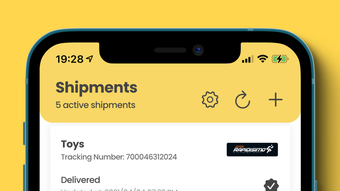
- Centralized Dashboard – View all active shipments in a unified interface, enabling quick status checks and better organization of delivery schedules.
- Automated Updates – The app automatically refreshes tracking data, reducing the need for manual input and minimizing user effort over time.
These features are particularly useful in professional environments where timely delivery confirmation is critical. For example, a small business owner can monitor customer orders across multiple couriers while keeping clients informed with shared tracking links. Individuals managing personal deliveries can avoid the frustration of checking multiple sites. The automation of updates ensures consistent visibility, even when users are away from their devices. The developer did not specify additional automation logic or integration options beyond the core tracking functionality.
User Interface, Workflow & Performance
The user interface of Xpres Tracking is designed with simplicity and clarity in mind. The main dashboard displays all active shipments in a clean, organized layout, with key details such as tracking number, carrier name, and current status visible at a glance. Navigation is intuitive, allowing users to add new shipments, view history, and access settings with minimal clicks.
The workflow follows a logical sequence: input tracking number → select carrier → confirm → receive updates. This streamlined process reduces friction and supports efficient daily use. The app’s performance is consistent with typical desktop utility applications, maintaining responsiveness even when managing multiple tracking entries.
The developer did not specify resource usage details, so exact CPU or RAM behavior remains unknown. Stability appears to be maintained across sessions, with no reported issues in general usage patterns. No performance benchmarks were provided, but the app’s lightweight nature (15.2 MB) suggests efficient operation on standard systems.
Compatibility & System Requirements
Xpres Tracking is compatible with both Windows and Mac operating systems, making it accessible to a wide range of desktop users. The software version is 2.3.1, released on April 15, 2024. The installation size is 15.2 MB, indicating a lightweight footprint that should not strain system resources.
Exact system requirements were not listed, so users should rely on general compatibility with modern desktop environments. The developer did not provide information about minimum hardware specifications, such as processor speed, RAM, or disk space. Platform-specific behavior details were not disclosed.
Users are advised to ensure their system meets standard requirements for running desktop applications. Compatibility information is limited to the operating systems listed.
Pros and Cons
Pros
- Supports over 70 shipping couriers, reducing the need for multiple tracking tools
- Push notifications deliver real-time updates without manual checks
- Centralized dashboard simplifies monitoring of multiple shipments
- One-click sharing enhances collaboration with clients or friends
- Free to download and use, with no hidden costs
Cons
- Exact system requirements were not specified
- No advanced analytics or reporting features were mentioned
- Limited customization options for notification preferences
- Offline functionality details were not provided
- Developer background and support channels are not publicly disclosed
FAQ Section
Is Xpres Tracking available for both Windows and Mac?
Yes, Xpres Tracking is compatible with both Windows and Mac operating systems.
Is the software free to use?
Yes, Xpres Tracking is available at no cost. There are no subscription fees or in-app purchases required.
Can I use Xpres Tracking without an internet connection?
While the app requires an internet connection to fetch tracking updates, it may retain previously loaded data for offline viewing. Specific offline behavior was not detailed by the developer.
How often are tracking updates refreshed?
The app automatically refreshes tracking information at regular intervals. The exact frequency was not specified in the provided documentation.
Does Xpres Tracking support international shipping carriers?
Yes, the software supports over 70 courier services, including international providers such as DHL and FedEx, enabling tracking of global shipments.
Final Thoughts + CTA
Xpres Tracking delivers a practical and efficient solution for users managing multiple shipments across diverse carriers. Its ability to consolidate tracking data from over 70 couriers into a single, intuitive interface stands out as a major advantage. The push notification system ensures users stay informed without constant manual checks, while the one-click sharing feature enhances communication with others.
The free pricing model increases accessibility, especially for individuals and small businesses. Although detailed system requirements and advanced features are not disclosed, the app’s lightweight design and straightforward workflow support reliable daily use. It is particularly well-suited for remote workers, e-commerce sellers, and anyone who values streamlined logistics.
With a clean interface and automation-focused design, Xpres Tracking effectively reduces the burden of package monitoring. Download Xpres Tracking now.







